Rabot 101: Installing Rabot Plus Hardware
Last updated: April 6, 2026
Overview
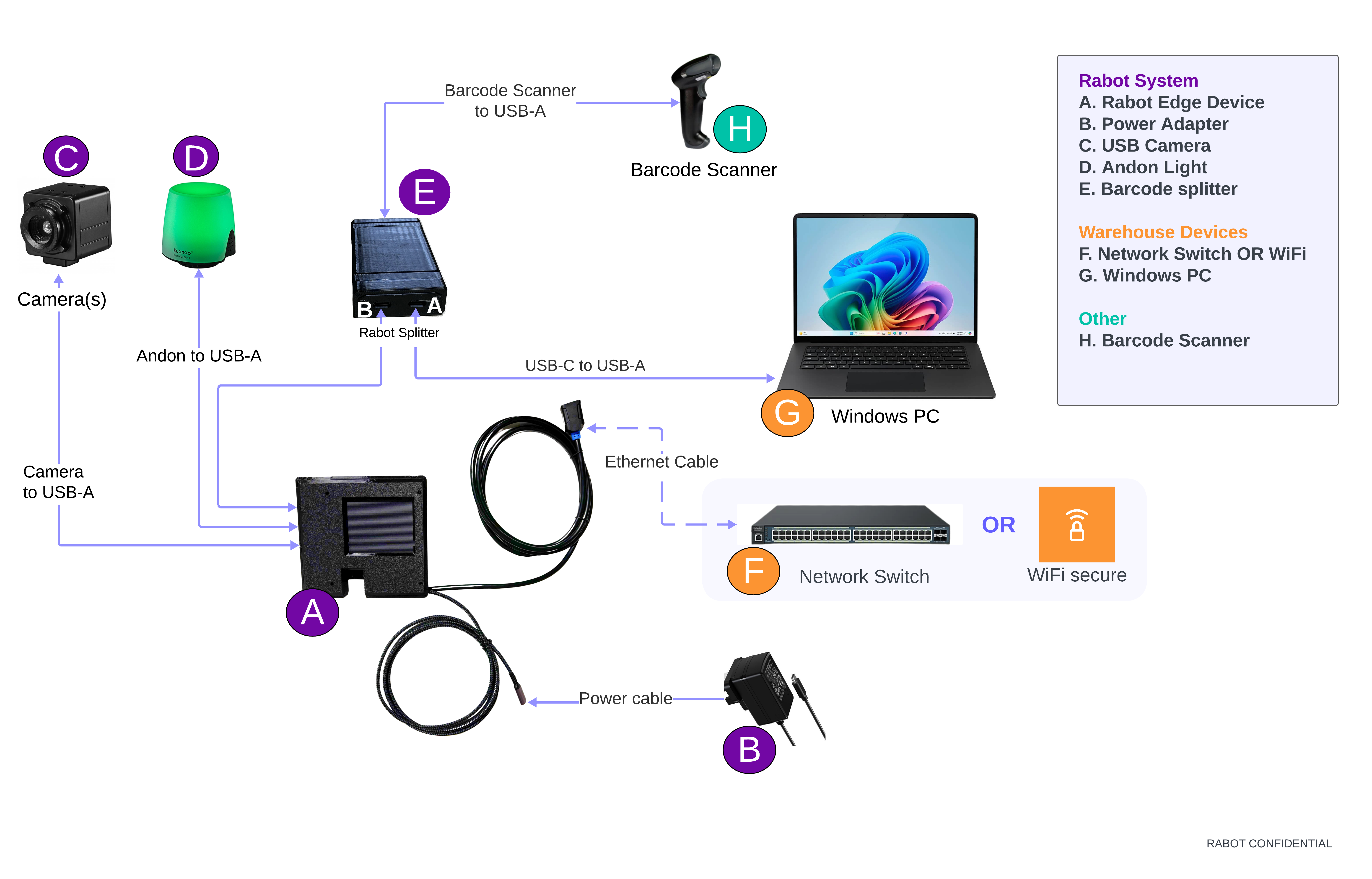
Follow this guide to install the Rabot Edge Device, cameras, barcode scanner, and Andon light so your station is ready for Operator Console usage.
As part of your kit, you will have the following devices:
Rabot Vision AI Edge Unit (A)
Power cables (B)
Camera (C)
Andon lights (D)
Rabot Splitter (E)
Network Switch/WiFi Router (F) - Not included in the kit
Packers Windows PC (G)
Barcode Scanner (H)
Troubleshooting
Symptom | Possible Cause | Fix |
Andon blinking yellow | Camera or scanner unplugged | Reconnect USB; check Wi‑Fi |
Video angle off | Camera bumped | Adjust mount & tighten clamp |
Station Offline in Admin Console | Network loss | Verify Ethernet/Wi‑Fi connection |
Note: It is required that Rabot Splitter Port A be connected to the Windows PC.